

Router position matters
When people think about improving their home Wi-Fi, they often look at their broadband package first.
But before you start chasing bigger speed numbers, it's worth looking at something much closer to home: your router.
It’s the starting point for every movie stream, gaming session, Teams call and TikTok binge in your house. Put it in the right place and your Wi-Fi can perform at its best. Put it in the wrong place and even the fastest broadband connection can struggle to reach where you need it.
Where do routers work best?
As a rule of thumb, routers work best when they're:
- Out in the open
- Positioned centrally in the home
- Raised off the floor
- Away from thick walls and large metal objects
- Not hidden away, next to fish tanks or under stairs
Think of your router like a speaker at a party. Stick it in a cupboard and nobody hears the music properly. The same goes for Wi-Fi.
A few quick wins
Before making any big changes, try these simple tweaks:
- Move your router into a more open space
- Raise it onto a shelf or unit
- Keep it clear of TVs, microwaves and other electronics
- Avoid placing it at one end of the house
- Check coverage in the rooms you use most
Sometimes the smallest changes can make the biggest difference.
Why Wi-Fi works better in some rooms
Wi-Fi's quite particular. It doesn't love walls, floors or long distances. That's why you might get full bars in the kitchen but have buffering nightmares in the bedroom. The signal weakens as it travels, so coverage can vary from room to room.
Speed's only half the story. You could have 900 Mbps, but if your signal can't reach the sofa, it's no good. That's why we're shifting the focus from just fast speeds to whole-home coverage.
The mistakes that make Wi-Fi feel worse
The usual suspects
A router hidden behind the television. A gaming setup three floors away from the router. A household with dozens of connected devices competing for attention. None of these are unusual. In fact, they're incredibly common.
The important thing is understanding that these factors can affect the experience you get around the home. That's why two households with the same broadband package can end up with completely different results.
One gets smooth streaming in every room. The other gets the spinning wheel of doom. These are called blank spots. Quite often, the cause is your setup, not your speed.

Why blanks spots happen in some homes
Let's break it down
Blanks spots - AKA dead zones, blind spots, or coverage gaps - are the places where your signal struggles to reach consistently.
The frustrating part is that you often assume the answer’s more speed, when what’s actually needed is better coverage. Understanding your home's layout is one of the easiest ways to improve your experience before spending money on a faster package.
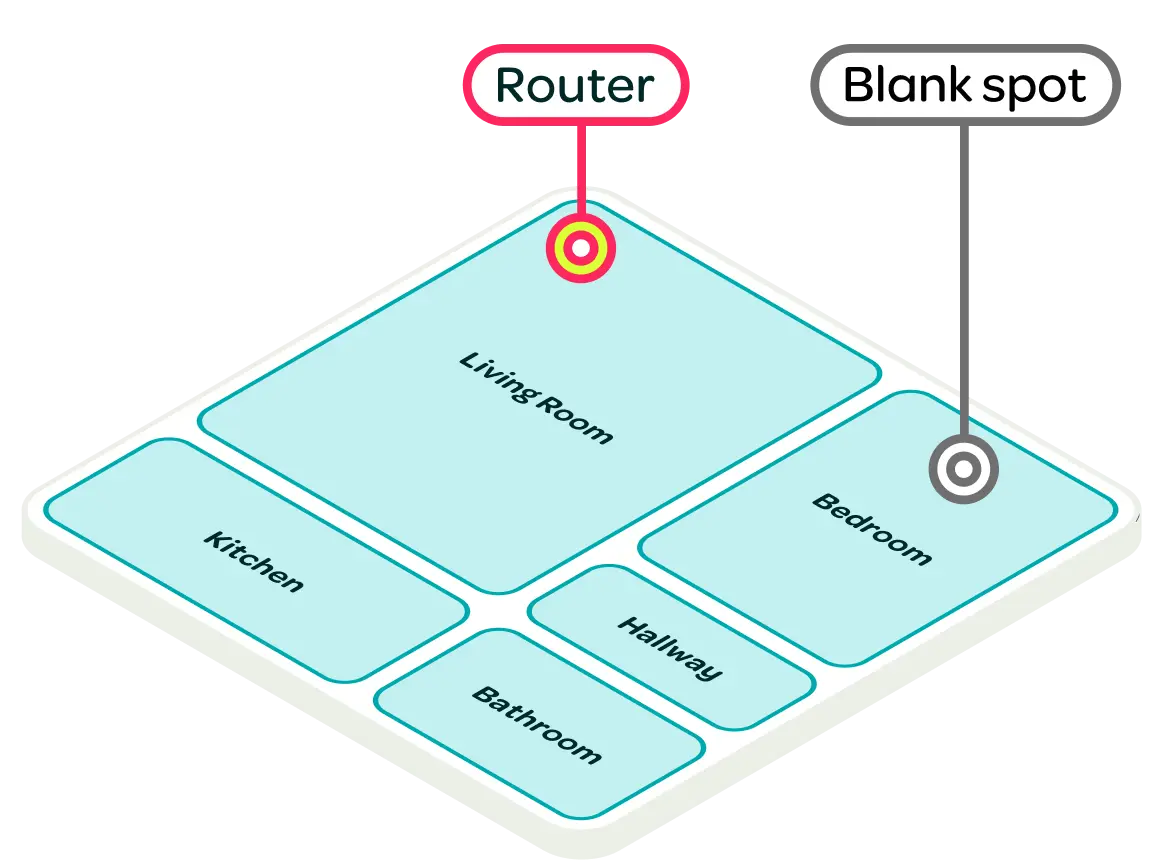
Broadband isn't used equally throughout the home. The room where your router sits isn't always where demand is highest.
Maybe someone's gaming upstairs. Maybe another person's on a video call in the spare room. Maybe two TVs are streaming at the same time while smart speakers, tablets and phones all stay connected in the background. Every home is different.
That's why the best Wi-Fi setup isn't about prioritising one room. It's about making sure coverage reaches the places where people actually live, work and play.
If gaming’s a big part of your household, our Broadband for Gaming guide can help you understand what matters most.

When one router isn't enough
Sometimes the issue isn't placement. Sometimes your home simply needs more help getting Wi-Fi everywhere it needs to go.
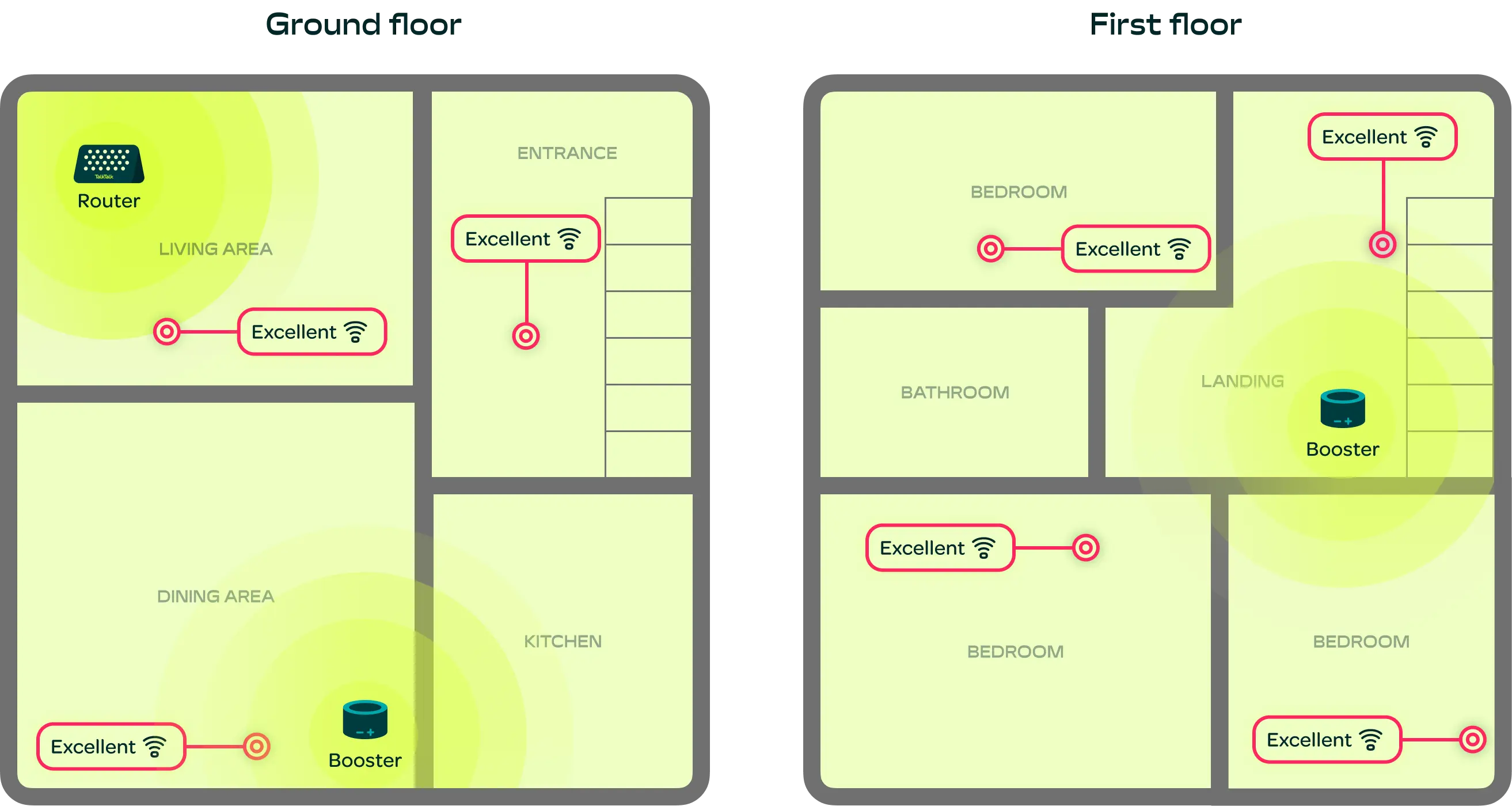
Larger homes, homes with multiple floors, or properties with particularly challenging layouts may benefit from additional boosters. That's where TalkTalk U’s smart algorithm comes into play. It can recommend extra kit to amplify your signal and help it reach everywhere you need it.
The goal isn't more speed. It's making sure the speed you already have can be enjoyed in more places.
It's not me. It's U
If your connection drops in certain rooms, buffers at peak times, or just can't keep up, it's not because you picked "the wrong speed". It's because traditional broadband isn't built around real homes.
It's also down to router placement, which is why we've paired TalkTalk U with our Wi-Fi Assist App.
"Nobody puts Baby in the corner." We feel the same about your router. How you set your equipment up and where you put it is crucial to making sure you get the coverage you deserve.
How Wi-Fi Assist fits in
Knowing your setup matters is one thing. Knowing how to improve it is another. Enter... Wi-Fi Assist.
Available exclusively to TalkTalk customers, it helps you understand how your Wi-Fi is performing around your home and highlights opportunities to improve coverage.
There are no long explanations, just show us the problem through the app’s simple video and photo annotation tool, and we’ll sort it.
Whether you're trying to find the best place for your router or understand why one room struggles more than another, Wi-Fi Assist helps take the guesswork out of getting better Wi-Fi.
Because great Wi-Fi starts with understanding your home.
Better setups start with small changes
The good news?
Getting better Wi-Fi doesn't always mean upgrading your package. Sometimes it's as simple as moving a router, understanding your home's layout, or making a few small changes to how your setup works.
Because Wi-Fi isn't just about what comes into your home. It's about how effectively that connection reaches the places where you actually use it.
That's the thinking behind TalkTalk U.
Instead of obsessing over speed alone, we're focused on something much more important – getting the right Wi-Fi experience for your home.
The result is simple. Better coverage. Fewer blank spots. Less guesswork. And a home Wi-Fi setup that works harder for you.

TalkTalk U


Compare deals

Broadband for gamers

Full Fibre broadband

